Dean and Program Director Inf…Project Deployment Procedures

Project Deployment Procedures

Effective January 2027

Blog Header

Thank you to those who attended the information sessions on the new online course project deployment process. For those who were unable to attend or would like to revisit the information, here is the recording and a copy of the slides from the Friday, November 6 Zoom session.
1

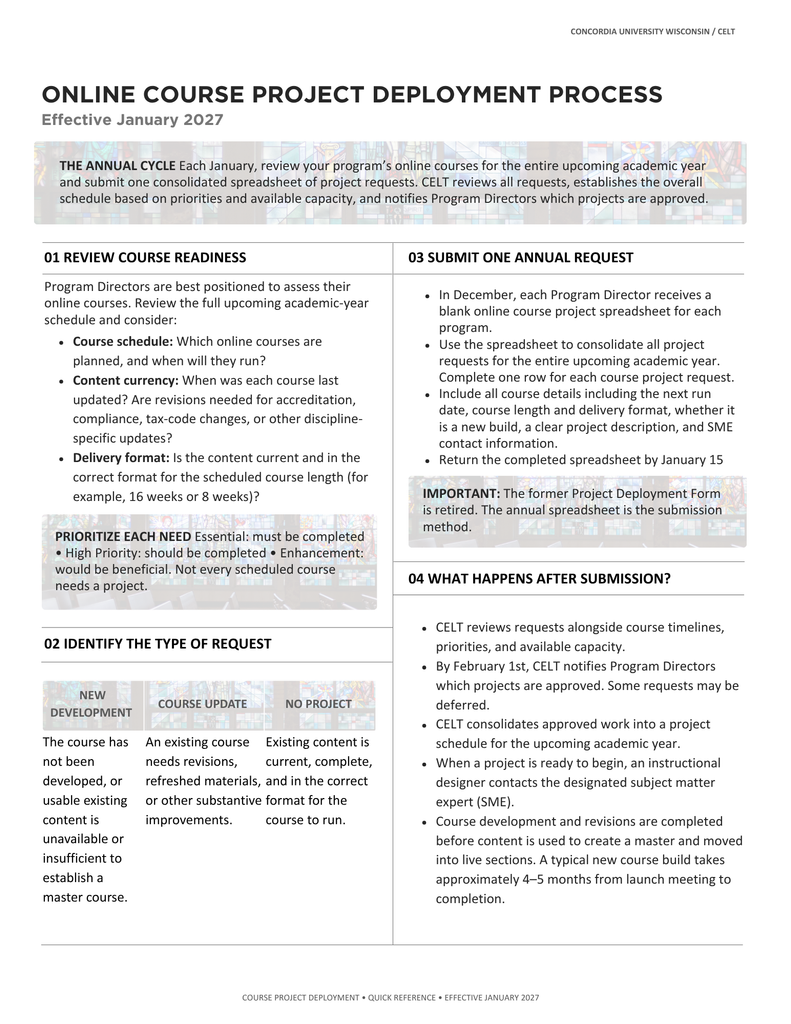
Online Course Project Deployment Process – Quick View: A recap of the new process and key steps.

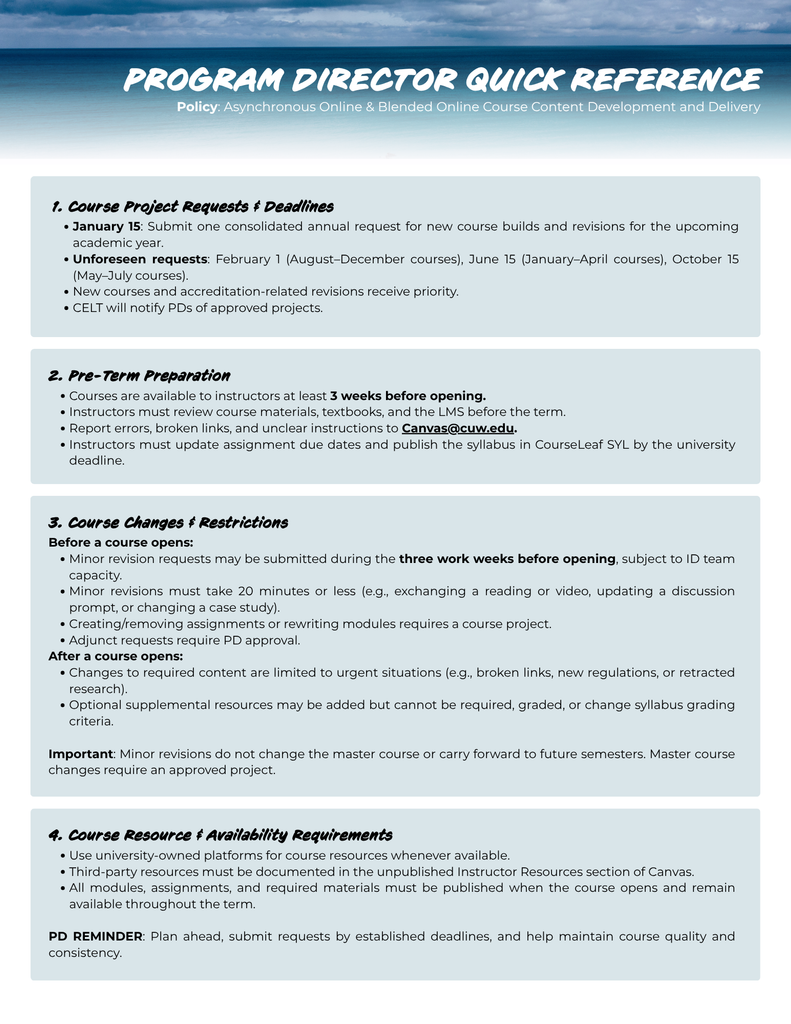
Policies for Asynchronous Online & Blended Online Course Content Development and Delivery: A quick-reference overview of the policy directly related to online course development and delivery.
2

1. Go to the Master_Code_List-11-6-26.xlsx

2. Scroll down to locate your program’s courses.

3. For any courses you would like to review, copy the corresponding access code from the list and paste it into a HelpSpot ticket sent to canvas@cuw.edu. You will then be granted viewing access to the requested courses. You may submit all of your course viewing requests in one ticket.

4. Every course should have a designated master course. If you do not see one of your courses listed, please include that information in a HelpSpot ticket, and we will follow up.

As part of the new process, Program Directors will be asked to complete a spreadsheet identifying requested online course projects for the 2027–2028 academic year.

The final deadline to submit the completed spreadsheet is January 15, 2027. However, several PDs expressed interest in receiving the spreadsheet early so they could begin working on it. We will distribute it again closer to the deadline, but I am including it now for anyone who would like to get an early start.

Helping Students Thrive: Recognizing and Responding to Student Mental Health Concerns in the Classroom


Led by: Rebecca Hasbani and Michael Casali

Dates: September 14, 2026

Location: Lakeshore Room

Faculty are often among the first to notice when a student is struggling, but knowing how to respond can feel overwhelming. This interactive session will provide practical guidance on recognizing common signs of student distress, responding with confidence and compassion, and connecting students with appropriate campus resources. We’ll also share current trends we’re seeing in the Student Wellness & Counseling Center, discuss effective classroom strategies that foster student well-being, and clarify how faculty can support students while maintaining healthy boundaries. Participants will leave with practical tools and greater confidence in helping students thrive both academically and personally. 

Face-to-Face Adjunct Orientation

Thursday, August 13, from 5:00-7:00 PM.

Presenters: Kate Robertson, Justin Cross, Andrew Wahl, Chris Schulz, Brian German, Erik Jorvig

Welcome new Adjunct instructors!  If you are teaching face-to-face, on-campus classes this academic year, this session is for you.  Information about campus resources, such as IT, AV, and the Academic Resource Center, will be shared.  We will also discuss our LCMS faith, some best practices for teaching, and general navigation of campus and systems.

Helpful links for reference: 

Link to Session Recording

Adjunct Instructor Resources on the CUW Portal

Canvas Training Video Library

Faculty Advancement in Rank Seminar

According to the faculty handbook, faculty who intend to apply must notify the Vice President for Academics and their Dean by August 1. Please do this by sending a brief email to Academic.Office@cuw.edu, and copy your dean.  (Please do not email me or Dr. Jorvig directly). 

The next step in the process is to complete your Advancement in Rank portfolio in Watermark. The portfolio must be completed by September 1.  Instructions concerning eligibility to apply, and what the portfolio requires, are found in the faculty handbook.  Please note that the Rank and Promotion committee has made a few small changes to the format of some pieces of the portfolio for this year; those will be included in the July 1, 2026, edition of the faculty handbook and are also attached here for your convenience.  Please direct any questions about those changes to members of the Faculty Rank and Promotion Committee.

To help faculty prepare, I am offering a Zoom session focused on explaining the timeline, process, and requirements for advancement in rank.  This will take place on Thursday, June 18, at noon Central Time.  Members of the Rank and Promotion committee will also be present to help clarify their committee’s process and answer questions. To register, please use this link:   https://cuwaa.zoom.us/meeting/register/Lg__j_4KRE2rHOz7QiBChg.  The session will be recorded; please register to receive that recording.  I recommend attending this session if you plan to apply this year or if you just want to learn more about the process for the future.

Session Slides

Session Recording

Grow in Your Faith: Resource Hub

Welcome to the Grow in Your Faith: Resource Hub!

This page is your starting point to deepen your spiritual journey at Concordia University and beyond. On this page you will find a collection of resources—including information about the Lutheran Church-Missouri Synod (LCMS), campus chapel live stream, and campus ministry information—alongside external tools like digital Bibles. Whether you’re seeking connection, inspiration, or practical support, this hub is designed to meet you where you are and help you grow in faith. Explore at your own pace, and know that you’re supported every step of the way!

The Lutheran Church—Missouri Synod (LCMS)

Concordia University is affiliated with The Lutheran Church-Missouri Synod. Visit the LCMS websiteLinks to an external site. to find a wide range of resources. Below are some resources to help you learn more!


Concordia University Resources 

Concordia University Wisconsin and Ann Arbor offer a wide variety resources and opportunities to grow in your faith. Take a few minutes to explore the resources specific to each campus. 


Accessing the Bible

Engaging with scripture is an important part of growing in faith. Below are a few electronic resources to access the bible. (NOTE: Please keep in mind these are third-party resources that are not managed or supported by CUWAA.) 


Growing Together 

In every course, you have the opportunity to grow in faith together by supporting one another in prayer and praising God’s divine work. Please use the Pray & Chat discussion board in your course to post prayer requests and praise reports as well as offer prayers for your classmates. 

Pedagogy and Strategy Workshop: Using AI to support your Teaching

Tuesday, April 7, from 12:00 – 1:00 pm in the Lakeshore Room  

Kari Bjerke, Jessica Leiberg, Kate Robertson, Tyler Shadick, Natalie Upson 

This workshop is geared toward all faculty, regardless of your comfort level with AI.  Join us for a brief tour of AI pedagogical resources that are accessible through an Organization in Canvas.  The second half of the workshop will be time to brainstorm and discuss AI, teaching, and assignment strategies with colleagues.  Please bring your laptop. 

Link to Recording

PowerPoint Slides

Link to Faculty Focus Article: When AI Gets It Wrong: A Pedagogical Approach

BoodleBox Training Resources

BoodleBox Basics – February 17th

This session provides a solid introduction to the software and covers the fundamental basics of the system to help you get started.

Session Recording

Session Resources:

Bot Design Deep Dive – March 19th

In this hour of learning, attendees will learn about real-world examples of bot successes and failures. They will discover what makes for quality bot design and how to employ best practices such as stress testing, maintenance, and collaboration. There will be time for Q and A and exploration of individual and collaborative use cases.

Session Recording

Session Resources:

Using AI for Meaningful Collaboration – March 30th

The hour will focus on how collaboration can be achieved within the BoodleBox platform. Attendees will learn about best practices, use cases, ethical implementation, and experience hands-on exploration. Attendees will have ideas and implementation strategies upon which they can build beyond the session. There will be time for Q and A.

Session Recording

Session Resources:

Reimagining Online Teaching in the Age of AI – April 30

This 90-minute working session shares the latest findings in online learning and moves into hands-on work integrating AI into online work. This includes stress-testing real assignments and examining what students are experiencing. We’ll tackle hard questions around academic integrity and assessment design in online contexts. Participants will leave with strategies for transformative learning within the online space.

Session Recording

Session Resources:

BoodleBox Faculty AI Champions – Exclusive Workshop – May 13

As an identified BoodleBox AI Champion, you are invited to this special session reserved for champions and pioneers of AI integration across campus. There will be time for workshopping and developing personal use cases. You will learn approaches to AI-integration, including how to guide others of varying abilities and views within your respective discipline and/or department. The session will close with Q and A.

Session Recording

Session Resources:

More Canvas Strategies for Faculty Success & Student Learning

Led by: Tyler Shadick, Kate Robertson, Natalie Upson, and Kari Bjerke

Dates: Monday, March 9, 2026 – 12noon-1 pm  

Location: Lakeshore Room

As we continue to get more comfortable with Canvas as a university community, this program will focus on ideas for streamlining your Canvas use. Come to this program to learn about using the Canvas App, better organizing your gradebook, and strategies for differentiating learning. Bring your laptop and any questions for the team.

Session Slides

Session Recording

Faculty Wellness Lunch n’ Learn

Led by: Nicole Muth, Nichole Ostrowski, Lisa Adams-Qualls

Date: February 25th, 12:00 PM-1:00 PM

Location: Lakeshore Room 

Holding Space While Holding Ourselves: Trauma-Informed Tools for Faculty Well-Being is a faculty-led, practical training designed to support CUW educators navigating the emotional realities of today’s classrooms. This session explores the cost of caring, the impact of student trauma on faculty, and core principles of trauma-informed teaching. Participants will gain simple, usable tools for responding when students disclose distress, setting healthy boundaries, and replenishing their own energy. Emphasizing psychological safety, choice, and sustainability, this session offers strategies faculty can use immediately to care well for students and themselves.

Self-care Assessment

Wellness Wheel

Self-Care Checklist

Session Slides

Using Tests and Quizzes in Canvas for Meaningful Student Learning

Led by: Tyler Shadick, Kate Robertson

Dates: Thursday, February 12th, 2026 – 12:00 – 1:00 PM

Location: Lakeshore Room

Come to this program to learn how and why to use tests and quizzes in Canvas. This program will focus both on the pedagogical decisions behind designing tests so students can demonstrate meaningful learning and the technological “how-to” of setting up tests in Canvas. Bring your laptop and any questions for the team.

Presentation Recording

Quizzes and Exams Training PowerPoint

Respondus Lockdown Browser Training PowerPoint